Presenting a proof of age attestation
When the user wants to access an age-restricted service, they are required to present a valid Proof of Age Attestation before being granted access. For demonstration purposes, a public verifier is available at verifier.ageverification.dev, which can be used to test the process.
The verifier can process the presentation using either the Digital Credentials API (DC API) or OpenID for Verifiable Presentations (OpenID4VP).
The Digital Credentials API is a browser-integrated API designed to make credential presentations more seamless and user-friendly by enabling direct interactions between the verifier (web service) and the user’s digital wallet on the same or cross device. It is currently being standardized by the World Wide Web Consortium (W3C) as part of the web platform to enable interoperable, privacy-preserving and secure credential exchange across browsers and devices. Further information about the specification is available at: https://www.w3.org/TR/digital-credentials.
OpenID4VP is an OpenID-based protocol that allows the user to present verifiable credentials through a secure, standards-based exchange between the wallet and the verifier.
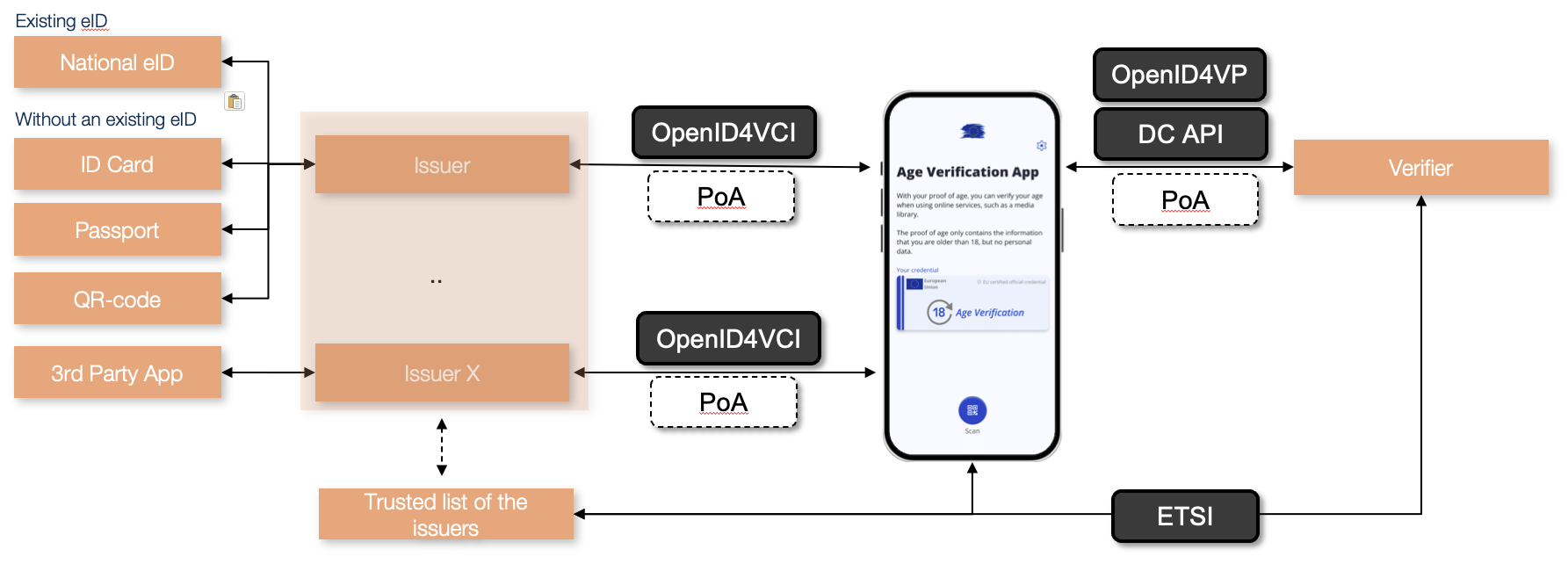
For future-proof interoperability and a smoother user experience, the Digital Credentials API shall be used whenever possible, as it represents the standard presentation interface for digital credentials within the AV and EUDI Wallet ecosystem. OID4VP is used as a fall-back mechanism as not all browsers support DC API.
Digital Credentials API
The demo application available at verifier.ageverification.dev is configured to automatically detect whether the user’s browser supports the Digital Credentials API. If DC API support is available, the website initiate the credential presentation directly through the DC API. In a cross-devise flow, DC API requires that bluetooth is activated in both devices, as bluetooth is used to confirm that the devices are in close proximity for added security.
If the browser does not support the DC API, the verifier automatically falls back to OpenID for Verifiable Presentations and displays a QR code that can be scanned with the Age Verification App.
When the process is started using the DC API, the credential data is requested directly from the wallet on the same device and the user is prompted to confirm the data sharing within the browser.
Once the user approves the data sharing, the verifier performs the same validation steps as in the OpenID4VP flow, including authenticity and trust checks and then displays the verification results on the webpage.
OpenId for Verifiable Presentations
OID4VP is used as a fall-back mechanism.
To begin verification, the user either opens their Age Verification App or scans the verifier’s QR code directly with the device’s camera. Upon scanning, the app recognizes that a Proof of Age is being requested and displays a prompt indicating that an age verification is required for the selected service.
The user is then given the option to approve the request. To ensure security and user consent, the app asks for PIN or biometric confirmation (such as face recognition). Once the user confirms, the necessary data is securely transmitted to the verifier service.
The verifier receives the Proof of Age Attestation, validates its authenticity and trust status using the AV Trusted List, and then displays the result of the verification process. This allows both the user and the service provider to immediately see whether the age verification has been successful.
Validation
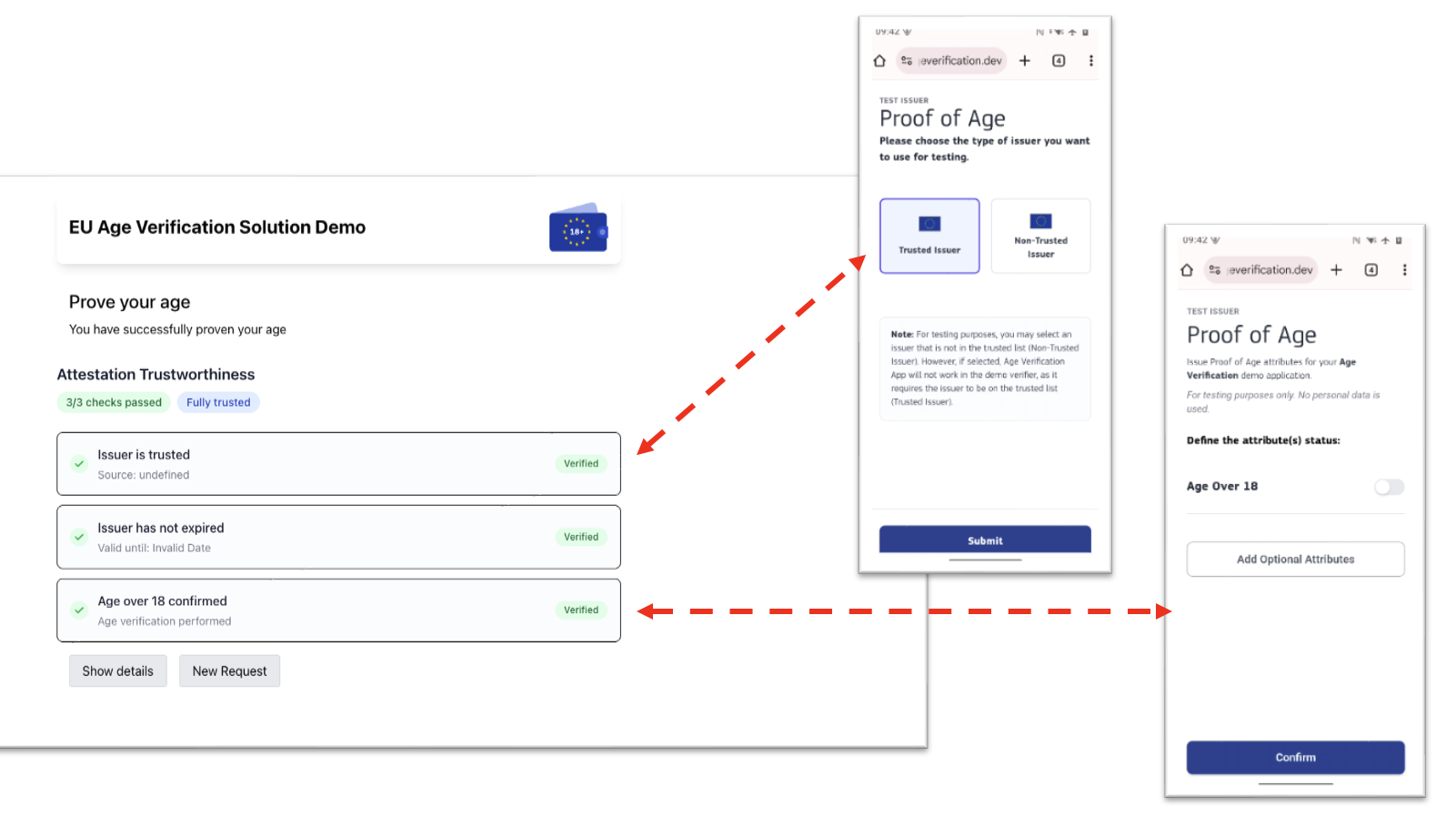
To verify whether an issuer is authorized to issue such attestations, the verifier uses an AV Trusted List.
European Commission published a test version of the AV trusted list to support development and interoperability testing. In addition, the backend also provides a sample Trusted List that can be adapted to include the appropriate trusted issuers. The verifier backend stores this Trusted List in its GitHub repository under the following path: src/main/resources/av-etsi-trusted-list.xml.
The verifier receives the Proof of Age Attestation, validates its authenticity and trust status using the AV Trusted List, and then displays the result of the verification process. This allows both the user and the service provider to immediately see whether the age verification has been successful.